

title: “Publishing formats” description: “Named formats for the platforms you publish to — pick one instead of typing an aspect ratio by hand.”
A format preset is a stored publishing format — “Instagram Reels is 9:16, capped at 900 seconds” — that you reach by naming the platform and placement instead of typingaspect_ratio and duration yourself. There are
21 presets across 7 platforms,
covering post content (feed, story, reels, video placements) as well as
profile and page identity assets (logos, banners, channel art).
You can name a preset in the Playground or Workflow Studio’s format control,
or ask the agent for a platform by name ("make this for Instagram Reels")
and it sets the preset for you. The control groups every preset by platform:
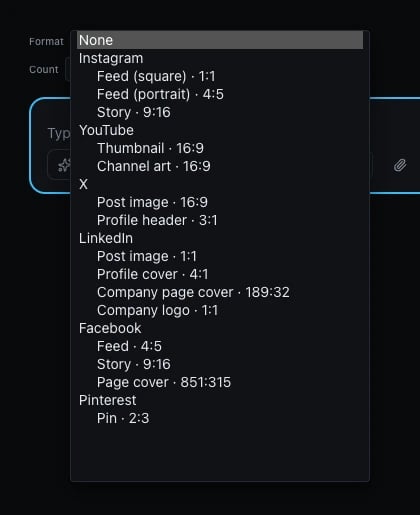
What picking a format actually does
A preset sets an intent, not a fixed request. Two things follow from that:- An explicit value you set still wins. If you set
aspect_ratioyourself alongside a format preset, your explicit value is used — the preset only fills in what you didn’t specify. - When the model you picked can’t produce the preset’s exact ratio, the
closest one it can produce is used instead, and the substitution is
reported back to you (as the
x-infery-param-adjustmentsresponse header over the API, or as a caption beneath the media in the Playground) so you always know what you actually got.
Cover and banner formats need an extra step
Three formats in the table below — LinkedIn’s profile cover (4:1), LinkedIn’s
company page cover (189:32), and X’s profile header (3:1) — are wider
than any image model can generate natively. No model in the catalog declares
those ratios, so they resolve to the closest ratio a model can
produce — in practice, 16:9 — and you get a wide rectangle, not a true
banner. The substitution is reported the same way as any other format
substitution, so it won’t be a silent surprise, but the result on its own is
not yet a usable banner: it needs a crop to reach the format’s real dimensions.
Over the API, the rectangle to crop to comes back on a response header.
Any image response generated with a format_preset carries
x-infery-format-frame: a JSON object, percent-encoded (a display name
contains an em-dash, which is not a legal HTTP header character — run it through
decodeURIComponent before JSON.parse). Its fields are preset_key,
display_name, aspect_ratio (the format’s TRUE ratio, not the one the model
produced), width and height (the exact pixels above), crop_needed, and
hinted. crop_needed: true is the case described here — the model could not
produce the format’s shape, and the image you got needs cutting down to
width × height. hinted: true means the prompt sent to the model was
extended with a composition hint, so the subject sits inside that rectangle.
Cropping to it is yours to do, with whatever image library you already use.
In the dashboard, that crop is one click. The Playground draws the frame
over the generated image, you position it, and the crop runs server-side and
resizes to the exact pixels above — as a new image, with the original left
where it is. That affordance is a dashboard action authenticated as a signed-in
user; there is no crop endpoint for API-key callers, and it is offered only for
a response holding exactly one image (one frame cannot say which of several
images it applies to). A request with n above 1 still gets the header on
every such response — just no button.
All formats
TikTok
YouTube
* YouTube — Channel art: the full 2560 × 1440 canvas is not all guaranteed visible — only the centered 1546 × 422 “safe zone” survives every device’s crop (phone, desktop and TV each crop it differently outside that area), so don’t put anything you need seen near the edges.
X
Dimensions marked
— for max duration are image formats and have no
duration. Duration ceilings shown here are the platform’s own published
limit; the model you generate with may offer a shorter maximum, in which
case the shorter one applies.