> ## Documentation Index
> Fetch the complete documentation index at: https://docs.infery.ai/llms.txt
> Use this file to discover all available pages before exploring further.
# Workflows
> Chain model calls, media generation, HTTP requests and media capabilities into one server-side workflow.
A **workflow** is a JSON definition of steps that run on our side. One request in, one
result out — the intermediate calls, the artifacts they produce and the money they cost
never leave our infrastructure.
Compared with orchestrating the same work yourself from a single `/v1/chat/completions`
call at a time, a workflow gives you:
* **One round trip.** A ten-step workflow is one HTTP request, not ten.
* **Bindings.** A step reads an earlier step's output by path — no glue code.
* **Artifacts that stay put.** An image a step generates is re-hosted in your workspace
and handed to the next step by reference, never re-uploaded by you.
* **A cost estimate before you run it.** [`POST /v1/workflows/estimate`](/workflows/running#estimating-a-run)
prices a definition without executing it.
Workflows are authored as JSON through the API, or visually in the workflow editor at
[app.infery.ai](https://app.infery.ai). Both write the same definition; everything on
these pages applies to either.
## Creating one
In the dashboard, **+** above the workflow list offers two starting points.
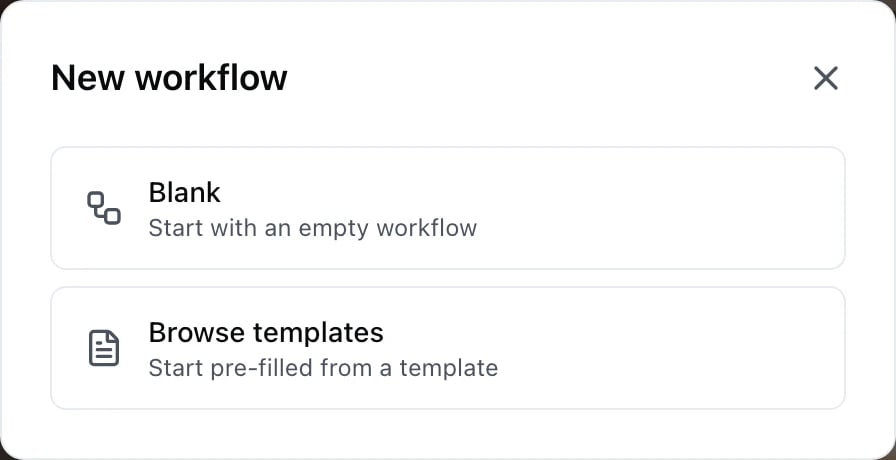
 **Blank** gives you an empty canvas — no steps, no output card yet. You name it and
start adding steps; an output card appears once you run it, already wired to
whatever step is left with nothing reading it.
**Browse templates** opens a gallery of working workflows you can copy.
**Blank** gives you an empty canvas — no steps, no output card yet. You name it and
start adding steps; an output card appears once you run it, already wired to
whatever step is left with nothing reading it.
**Browse templates** opens a gallery of working workflows you can copy.

 The tags under each card are the **step types** the template uses — `web.search`,
`model`, `foreach`, `code.run_python`. They are the fastest way to find a worked
example of a step you have not used before: pick the template that carries the
tag, open it, and read what it does with it.
A template is copied into your workspace, not linked. Editing your copy changes
nothing for anyone else, and the template does not change under you later.
Through the API, the same thing is
[`POST /v1/workflows`](/api-reference/workflows/create) — and
[`GET /v1/workflows/templates`](/api-reference/workflows/templates-list) lists the
same catalogue, with `sample_input` you can run a template with unchanged.
## A minimal workflow
```json theme={null}
{
"inputs": [
{ "name": "topic", "type": "text" }
],
"steps": [
{
"id": "outline",
"type": "model",
"model": "gpt-5",
"input": {
"messages": [
{ "role": "user", "content": "Write a three-bullet outline about ${input.topic}." }
]
}
},
{
"id": "post",
"type": "model",
"model": "gpt-5",
"input": {
"messages": [
{ "role": "user", "content": "Expand this outline into a short post:\n${steps.outline.output.choices.0.message.content}" }
]
}
}
],
"output": {
"post": "${steps.post.output.choices.0.message.content}"
}
}
```
Run it inline, without storing it:
```bash curl theme={null}
curl https://api.infery.ai/v1/workflows/runs \
-H "Authorization: Bearer $INFERY_API_KEY" \
-H "Content-Type: application/json" \
-d '{
"definition": { "...": "the JSON above" },
"input": { "topic": "cold brew" }
}'
```
## The parts of a definition
| Key | Required | What it is |
| -------------------------- | -------- | ------------------------------------------------------------------------------------------------------------------------------------------------------------------------------------------------------------------------------------------------------------- |
| `steps` | yes | An array of at least one step. See [Step types](/workflows/step-types). |
| `inputs` | no | Declarations for the run inputs the definition references. Required in practice — see below. |
| `output` | no | A map of result names to binding expressions. Absent, the run returns `{"result": }`. |
| `failure_mode` | no | `fail_fast` (default) or `continue`. |
| `concurrency` | no | How many top-level steps may run at once. Integer **1–20**, default **5**. `1` runs the workflow strictly one step at a time. |
| `retry` | no | Workflow-level retry policy — see [Step types](/workflows/step-types#retry). |
| `pipeline_timeout_seconds` | refused | Not a real setting. It was accepted once but never enforced, so the write-time schema now rejects it outright, whatever value you send — remove it and bound a run with per-step [`timeout_seconds`](/workflows/step-types#fields-every-step-shares) instead. |
| `ui` | no | Canvas layout the workflow editor writes. Nothing on the run path reads it. |
The definition object is **strict**: an unrecognised top-level key is refused, not ignored.
## Declaring run inputs
Every `${input.X}` reachable from the executable part of a definition must appear in
`inputs`, or the save is refused naming the ones that do not:
```json theme={null}
{
"inputs": [
{ "name": "topic", "type": "text", "label": "Topic" },
{ "name": "tone", "type": "text", "required": false, "default": "neutral" },
{ "name": "photo", "type": "image" }
]
}
```
| Field | Notes |
| ---------------------- | ---------------------------------------------------------------------------------- |
| `name` | Letters, digits, `_` and `-` only; up to 120 characters. Unique within the list. |
| `type` | One of `text`, `number`, `boolean`, `json`, `image`, `video`, `audio`, `file`. |
| `required` | Defaults to **true** when absent. |
| `default` | Only allowed when `required` is `false`. Injected into a run that omits the input. |
| `label`, `description` | Presentational. Up to 120 and 300 characters. |
A definition may declare at most **50** inputs. The media types (`image`, `video`,
`audio`, `file`) carry a URL or a workspace file id — both plain strings.
## How outputs flow
Each step publishes its result under its own id. A later step names it with a
[binding](/workflows/bindings):
```
${steps..output.}
```
The shape under `output` is whatever that step type produces — an OpenAI
`chat.completion` object for a `model` step, `{url, file_id, modality, …}` for a `media`
step, `{status, headers, body, …}` for an `http` step. [Step types](/workflows/step-types)
lists each one.
Top-level steps are ordered by their dependencies, not by the order you wrote them, so a
step may reference one declared after it. **That is not true inside a `foreach` body or a
`parallel` branch** — see [Containers](/workflows/containers#a-body-runs-in-array-order).
## Independent steps run at the same time
A top-level step starts as soon as every step it reads has finished. Two steps that read
nothing from each other therefore overlap, up to the `concurrency` ceiling (default 5).
You do not need a `parallel` step to get this.
```json theme={null}
{
"steps": [
{ "id": "clip", "type": "media", "capability": "video.generate", "input": { "prompt": "${input.scene}" } },
{ "id": "music", "type": "media", "capability": "audio.generate", "input": { "prompt": "${input.mood}" } },
{ "id": "scored", "type": "media", "capability": "video.add_audio",
"input": { "video_url": "${steps.clip.outputRef}", "audio_url": "${steps.music.outputRef}" } }
]
}
```
`clip` and `music` run together; `scored` waits for both.
**`fail_fast` stops what has not started — it cannot stop what has.** When a step fails,
no further step is dispatched, but a step already sent to a provider runs to completion and
is billed. Its credits are included in the run's `creditsUsed` and its verdict in
`stepRuns`; nothing is refunded. The run reports `failed` once the steps that were already
running have finished.
Set `"concurrency": 1` if you need a run where a failure can cost nothing beyond the step
that failed.
## Where to go next
The `${…}` grammar: paths, projections, fallbacks, artifact references.
`model`, `media`, `three_d`, `http`, `sub_pipeline` and the 31 capabilities.
`foreach` and `parallel` — scope, ordering and limits.
Sync, stream and async modes, plus cost estimates.
The tags under each card are the **step types** the template uses — `web.search`,
`model`, `foreach`, `code.run_python`. They are the fastest way to find a worked
example of a step you have not used before: pick the template that carries the
tag, open it, and read what it does with it.
A template is copied into your workspace, not linked. Editing your copy changes
nothing for anyone else, and the template does not change under you later.
Through the API, the same thing is
[`POST /v1/workflows`](/api-reference/workflows/create) — and
[`GET /v1/workflows/templates`](/api-reference/workflows/templates-list) lists the
same catalogue, with `sample_input` you can run a template with unchanged.
## A minimal workflow
```json theme={null}
{
"inputs": [
{ "name": "topic", "type": "text" }
],
"steps": [
{
"id": "outline",
"type": "model",
"model": "gpt-5",
"input": {
"messages": [
{ "role": "user", "content": "Write a three-bullet outline about ${input.topic}." }
]
}
},
{
"id": "post",
"type": "model",
"model": "gpt-5",
"input": {
"messages": [
{ "role": "user", "content": "Expand this outline into a short post:\n${steps.outline.output.choices.0.message.content}" }
]
}
}
],
"output": {
"post": "${steps.post.output.choices.0.message.content}"
}
}
```
Run it inline, without storing it:
```bash curl theme={null}
curl https://api.infery.ai/v1/workflows/runs \
-H "Authorization: Bearer $INFERY_API_KEY" \
-H "Content-Type: application/json" \
-d '{
"definition": { "...": "the JSON above" },
"input": { "topic": "cold brew" }
}'
```
## The parts of a definition
| Key | Required | What it is |
| -------------------------- | -------- | ------------------------------------------------------------------------------------------------------------------------------------------------------------------------------------------------------------------------------------------------------------- |
| `steps` | yes | An array of at least one step. See [Step types](/workflows/step-types). |
| `inputs` | no | Declarations for the run inputs the definition references. Required in practice — see below. |
| `output` | no | A map of result names to binding expressions. Absent, the run returns `{"result": }`. |
| `failure_mode` | no | `fail_fast` (default) or `continue`. |
| `concurrency` | no | How many top-level steps may run at once. Integer **1–20**, default **5**. `1` runs the workflow strictly one step at a time. |
| `retry` | no | Workflow-level retry policy — see [Step types](/workflows/step-types#retry). |
| `pipeline_timeout_seconds` | refused | Not a real setting. It was accepted once but never enforced, so the write-time schema now rejects it outright, whatever value you send — remove it and bound a run with per-step [`timeout_seconds`](/workflows/step-types#fields-every-step-shares) instead. |
| `ui` | no | Canvas layout the workflow editor writes. Nothing on the run path reads it. |
The definition object is **strict**: an unrecognised top-level key is refused, not ignored.
## Declaring run inputs
Every `${input.X}` reachable from the executable part of a definition must appear in
`inputs`, or the save is refused naming the ones that do not:
```json theme={null}
{
"inputs": [
{ "name": "topic", "type": "text", "label": "Topic" },
{ "name": "tone", "type": "text", "required": false, "default": "neutral" },
{ "name": "photo", "type": "image" }
]
}
```
| Field | Notes |
| ---------------------- | ---------------------------------------------------------------------------------- |
| `name` | Letters, digits, `_` and `-` only; up to 120 characters. Unique within the list. |
| `type` | One of `text`, `number`, `boolean`, `json`, `image`, `video`, `audio`, `file`. |
| `required` | Defaults to **true** when absent. |
| `default` | Only allowed when `required` is `false`. Injected into a run that omits the input. |
| `label`, `description` | Presentational. Up to 120 and 300 characters. |
A definition may declare at most **50** inputs. The media types (`image`, `video`,
`audio`, `file`) carry a URL or a workspace file id — both plain strings.
## How outputs flow
Each step publishes its result under its own id. A later step names it with a
[binding](/workflows/bindings):
```
${steps..output.}
```
The shape under `output` is whatever that step type produces — an OpenAI
`chat.completion` object for a `model` step, `{url, file_id, modality, …}` for a `media`
step, `{status, headers, body, …}` for an `http` step. [Step types](/workflows/step-types)
lists each one.
Top-level steps are ordered by their dependencies, not by the order you wrote them, so a
step may reference one declared after it. **That is not true inside a `foreach` body or a
`parallel` branch** — see [Containers](/workflows/containers#a-body-runs-in-array-order).
## Independent steps run at the same time
A top-level step starts as soon as every step it reads has finished. Two steps that read
nothing from each other therefore overlap, up to the `concurrency` ceiling (default 5).
You do not need a `parallel` step to get this.
```json theme={null}
{
"steps": [
{ "id": "clip", "type": "media", "capability": "video.generate", "input": { "prompt": "${input.scene}" } },
{ "id": "music", "type": "media", "capability": "audio.generate", "input": { "prompt": "${input.mood}" } },
{ "id": "scored", "type": "media", "capability": "video.add_audio",
"input": { "video_url": "${steps.clip.outputRef}", "audio_url": "${steps.music.outputRef}" } }
]
}
```
`clip` and `music` run together; `scored` waits for both.
**`fail_fast` stops what has not started — it cannot stop what has.** When a step fails,
no further step is dispatched, but a step already sent to a provider runs to completion and
is billed. Its credits are included in the run's `creditsUsed` and its verdict in
`stepRuns`; nothing is refunded. The run reports `failed` once the steps that were already
running have finished.
Set `"concurrency": 1` if you need a run where a failure can cost nothing beyond the step
that failed.
## Where to go next
The `${…}` grammar: paths, projections, fallbacks, artifact references.
`model`, `media`, `three_d`, `http`, `sub_pipeline` and the 31 capabilities.
`foreach` and `parallel` — scope, ordering and limits.
Sync, stream and async modes, plus cost estimates.