> ## Documentation Index
> Fetch the complete documentation index at: https://docs.infery.ai/llms.txt
> Use this file to discover all available pages before exploring further.
# Publishing formats
***
title: "Publishing formats"
description: "Named formats for the platforms you publish to — pick one instead of typing an aspect ratio by hand."
-------------------------------------------------------------------------------------------------------------------
A **format preset** is a stored publishing format — "Instagram Reels is 9:16,
capped at 900 seconds" — that you reach by naming the platform and placement
instead of typing `aspect_ratio` and `duration` yourself. There are
**21 presets** across 7 platforms,
covering post content (feed, story, reels, video placements) as well as
profile and page identity assets (logos, banners, channel art).
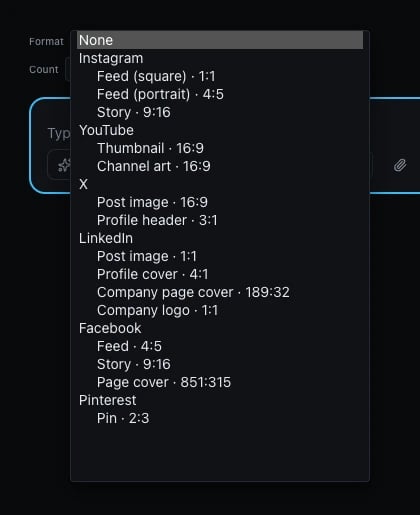
You can name a preset in the Playground or Workflow Studio's format control,
or ask the agent for a platform by name (`"make this for Instagram Reels"`)
and it sets the preset for you. The control groups every preset by platform:
 ## What picking a format actually does
A preset sets an **intent**, not a fixed request. Two things follow from that:
* **An explicit value you set still wins.** If you set `aspect_ratio`
yourself alongside a format preset, your explicit value is used — the
preset only fills in what you didn't specify.
* **When the model you picked can't produce the preset's exact ratio, the
closest one it can produce is used instead**, and the substitution is
reported back to you (as the `x-infery-param-adjustments` response header
over the API, or as a caption beneath the media in the Playground) so you
always know what you actually got.
## Cover and banner formats need an extra step today
Three formats in the table below — LinkedIn's profile cover (`4:1`), LinkedIn's
company page cover (`189:32`), and X's profile header (`3:1`) — are wider
than any image model can generate natively. No model in the catalog declares
those ratios, so today they resolve to the closest ratio a model *can*
produce — in practice, **16:9** — and you get a wide rectangle, not a true
banner. The substitution is reported the same way as any other format
substitution, so it won't be a silent surprise, but the result on its own is
not yet a usable banner: it needs a crop or pad step afterward to reach the
format's real dimensions. Until that step is available in your workflow,
treat a cover/banner preset as a starting image to crop, not a finished asset.
## All formats
### Instagram
| Key | Format | Kind | Ratio | Dimensions | Max duration |
| ------------------------- | --------------------------- | ----- | ------ | ----------- | ------------ |
| `instagram.feed_square` | Instagram — Feed (square) | Image | `1:1` | 1080 × 1080 | — |
| `instagram.feed_portrait` | Instagram — Feed (portrait) | Image | `4:5` | 1080 × 1350 | — |
| `instagram.story` | Instagram — Story | Image | `9:16` | 1080 × 1920 | — |
| `instagram.reels` | Instagram — Reels | Video | `9:16` | 1080 × 1920 | 900s |
### TikTok
| Key | Format | Kind | Ratio | Dimensions | Max duration |
| -------------- | -------------- | ----- | ------ | ----------- | ------------ |
| `tiktok.video` | TikTok — Video | Video | `9:16` | 1080 × 1920 | 180s |
### YouTube
| Key | Format | Kind | Ratio | Dimensions | Max duration |
| --------------------- | ------------------------ | ----- | ------ | ----------- | ------------ |
| `youtube.short` | YouTube — Short | Video | `9:16` | 1080 × 1920 | 180s |
| `youtube.thumbnail` | YouTube — Thumbnail | Image | `16:9` | 3840 × 2160 | — |
| `youtube.video` | YouTube — Video | Video | `16:9` | 1920 × 1080 | — |
| `youtube.channel_art` | YouTube — Channel art \* | Image | `16:9` | 2560 × 1440 | — |
\* **YouTube — Channel art**: the full 2560 × 1440 canvas is not all guaranteed visible — only the centered 1546 × 422 "safe zone" survives every device's crop (phone, desktop and TV each crop it differently outside that area), so don't put anything you need seen near the edges.
### X
| Key | Format | Kind | Ratio | Dimensions | Max duration |
| ---------- | ------------------ | ----- | ------ | ----------- | ------------ |
| `x.post` | X — Post image | Image | `16:9` | 1600 × 900 | — |
| `x.video` | X — Video | Video | `16:9` | 1920 × 1080 | 140s |
| `x.header` | X — Profile header | Image | `3:1` | 1500 × 500 | — |
### LinkedIn
| Key | Format | Kind | Ratio | Dimensions | Max duration |
| ------------------------ | ----------------------------- | ----- | -------- | ----------- | ------------ |
| `linkedin.post` | LinkedIn — Post image | Image | `1:1` | 1200 × 1200 | — |
| `linkedin.video` | LinkedIn — Video | Video | `16:9` | 1920 × 1080 | 1800s |
| `linkedin.profile_cover` | LinkedIn — Profile cover | Image | `4:1` | 1584 × 396 | — |
| `linkedin.company_cover` | LinkedIn — Company page cover | Image | `189:32` | 1512 × 256 | — |
| `linkedin.company_logo` | LinkedIn — Company logo | Image | `1:1` | 400 × 400 | — |
### Facebook
| Key | Format | Kind | Ratio | Dimensions | Max duration |
| --------------------- | --------------------- | ----- | --------- | ----------- | ------------ |
| `facebook.feed` | Facebook — Feed | Image | `4:5` | 1440 × 1800 | — |
| `facebook.story` | Facebook — Story | Image | `9:16` | 1440 × 2560 | — |
| `facebook.page_cover` | Facebook — Page cover | Image | `851:315` | 851 × 315 | — |
### Pinterest
| Key | Format | Kind | Ratio | Dimensions | Max duration |
| --------------- | --------------- | ----- | ----- | ----------- | ------------ |
| `pinterest.pin` | Pinterest — Pin | Image | `2:3` | 1000 × 1500 | — |
Dimensions marked `—` for max duration are image formats and have no
duration. Duration ceilings shown here are the platform's own published
limit; the model you generate with may offer a shorter maximum, in which
case the shorter one applies.
## What picking a format actually does
A preset sets an **intent**, not a fixed request. Two things follow from that:
* **An explicit value you set still wins.** If you set `aspect_ratio`
yourself alongside a format preset, your explicit value is used — the
preset only fills in what you didn't specify.
* **When the model you picked can't produce the preset's exact ratio, the
closest one it can produce is used instead**, and the substitution is
reported back to you (as the `x-infery-param-adjustments` response header
over the API, or as a caption beneath the media in the Playground) so you
always know what you actually got.
## Cover and banner formats need an extra step today
Three formats in the table below — LinkedIn's profile cover (`4:1`), LinkedIn's
company page cover (`189:32`), and X's profile header (`3:1`) — are wider
than any image model can generate natively. No model in the catalog declares
those ratios, so today they resolve to the closest ratio a model *can*
produce — in practice, **16:9** — and you get a wide rectangle, not a true
banner. The substitution is reported the same way as any other format
substitution, so it won't be a silent surprise, but the result on its own is
not yet a usable banner: it needs a crop or pad step afterward to reach the
format's real dimensions. Until that step is available in your workflow,
treat a cover/banner preset as a starting image to crop, not a finished asset.
## All formats
### Instagram
| Key | Format | Kind | Ratio | Dimensions | Max duration |
| ------------------------- | --------------------------- | ----- | ------ | ----------- | ------------ |
| `instagram.feed_square` | Instagram — Feed (square) | Image | `1:1` | 1080 × 1080 | — |
| `instagram.feed_portrait` | Instagram — Feed (portrait) | Image | `4:5` | 1080 × 1350 | — |
| `instagram.story` | Instagram — Story | Image | `9:16` | 1080 × 1920 | — |
| `instagram.reels` | Instagram — Reels | Video | `9:16` | 1080 × 1920 | 900s |
### TikTok
| Key | Format | Kind | Ratio | Dimensions | Max duration |
| -------------- | -------------- | ----- | ------ | ----------- | ------------ |
| `tiktok.video` | TikTok — Video | Video | `9:16` | 1080 × 1920 | 180s |
### YouTube
| Key | Format | Kind | Ratio | Dimensions | Max duration |
| --------------------- | ------------------------ | ----- | ------ | ----------- | ------------ |
| `youtube.short` | YouTube — Short | Video | `9:16` | 1080 × 1920 | 180s |
| `youtube.thumbnail` | YouTube — Thumbnail | Image | `16:9` | 3840 × 2160 | — |
| `youtube.video` | YouTube — Video | Video | `16:9` | 1920 × 1080 | — |
| `youtube.channel_art` | YouTube — Channel art \* | Image | `16:9` | 2560 × 1440 | — |
\* **YouTube — Channel art**: the full 2560 × 1440 canvas is not all guaranteed visible — only the centered 1546 × 422 "safe zone" survives every device's crop (phone, desktop and TV each crop it differently outside that area), so don't put anything you need seen near the edges.
### X
| Key | Format | Kind | Ratio | Dimensions | Max duration |
| ---------- | ------------------ | ----- | ------ | ----------- | ------------ |
| `x.post` | X — Post image | Image | `16:9` | 1600 × 900 | — |
| `x.video` | X — Video | Video | `16:9` | 1920 × 1080 | 140s |
| `x.header` | X — Profile header | Image | `3:1` | 1500 × 500 | — |
### LinkedIn
| Key | Format | Kind | Ratio | Dimensions | Max duration |
| ------------------------ | ----------------------------- | ----- | -------- | ----------- | ------------ |
| `linkedin.post` | LinkedIn — Post image | Image | `1:1` | 1200 × 1200 | — |
| `linkedin.video` | LinkedIn — Video | Video | `16:9` | 1920 × 1080 | 1800s |
| `linkedin.profile_cover` | LinkedIn — Profile cover | Image | `4:1` | 1584 × 396 | — |
| `linkedin.company_cover` | LinkedIn — Company page cover | Image | `189:32` | 1512 × 256 | — |
| `linkedin.company_logo` | LinkedIn — Company logo | Image | `1:1` | 400 × 400 | — |
### Facebook
| Key | Format | Kind | Ratio | Dimensions | Max duration |
| --------------------- | --------------------- | ----- | --------- | ----------- | ------------ |
| `facebook.feed` | Facebook — Feed | Image | `4:5` | 1440 × 1800 | — |
| `facebook.story` | Facebook — Story | Image | `9:16` | 1440 × 2560 | — |
| `facebook.page_cover` | Facebook — Page cover | Image | `851:315` | 851 × 315 | — |
### Pinterest
| Key | Format | Kind | Ratio | Dimensions | Max duration |
| --------------- | --------------- | ----- | ----- | ----------- | ------------ |
| `pinterest.pin` | Pinterest — Pin | Image | `2:3` | 1000 × 1500 | — |
Dimensions marked `—` for max duration are image formats and have no
duration. Duration ceilings shown here are the platform's own published
limit; the model you generate with may offer a shorter maximum, in which
case the shorter one applies.